How It Works: Predictive ThermometerUpdated 2 months ago
Your thermometer works in two modes, and it switches between them on its own depending on whether you have set a target temperature.
Instant read mode
This is the default. Take the thermometer out of its charger or Booster and it wakes up in instant read, reporting the temperature at the tip in about 4 to 5 seconds.
Use it the way you would use any handheld thermometer: spot-check a steak, check a pan, check a proofing dough. Nothing to set up.
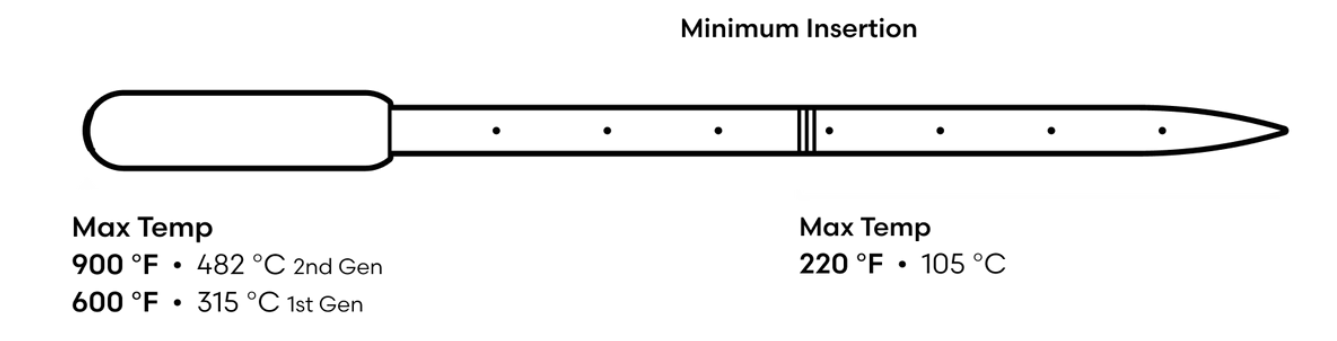
The one thing to get right is depth. The thermometer reads from eight sensors along its length, so it needs to be in far enough for those sensors to be in the food. For a quick check on something thin, insert at an angle.

Predictive cooking mode
Setting a target temperature is what switches modes. Once you do, the thermometer stops being a thermometer that tells you the temperature now and starts telling you when your food will be ready.
In the app: tap Predict on the main screen, set your temperature, then tap Begin prediction.
On the Display: press the m- and s+ buttons to set the "cooking to" temperature, then press start. The temperature stops blinking once it is set.
Then apply heat. Oven, smoker, grill, frying pan- it does not matter.
Reading the prediction
Two numbers appear as the cook progresses.
Percent complete shows up straight away. It is how far through the cook you are, not how hot the food is.
"Ready in" is the prediction, and it appears at roughly a third of the way through. It does not show up immediately because the thermometer needs to watch how your food is actually absorbing heat before it can say anything useful about when it will finish. A prediction offered in the first minute would be a guess.
The countdown will move, and that is correct. It recalculates continuously as conditions change. Opening the oven, a fire dying back, or a stall on a brisket all change the answer, and the number updates rather than pretending the first estimate was right.
When it reaches 00:00, an alarm sounds.
Why insertion depth matters so much here
In instant read, a shallow insertion gives you an odd number. In predictive cooking, it gives you a wrong prediction, because the thermometer is modelling heat moving through the food, and it needs the sensors in the right places to do it.
Insert to at least the minimum line, about 2 inches (50 mm). The line is marked on the probe and should be inside the food, not visible. Most prediction complaints turn out to be insertion.
Also worth knowing: putting the thermometer in after cooking has started, or pulling it out and repositioning it mid-cook, can confuse the prediction. Insert once, at the start.
Switching between °F and °C
In the app: tap the three dots at the right edge of the screen, near "ready in".
On the Display: hold temp and light together.
Still have a question?
If a prediction is well out, or the countdown is not appearing, email [email protected] and tell us what you were cooking, at what temperature, and how the thermometer was inserted. A photo of the insertion helps.
Predictive Thermometer Basics explains what the eight sensors do and why prediction is possible at all.
Setup Guide: Predictive Thermometer covers first-time setup.
Understanding Your Temperature Readings: Normal vs. a Problem covers readings that look wrong.
[Related keywords: how it works, how does it work, how do i use it, how to use, instant read, instant read mode, spot check, quick reading, handheld, like a thermapen, predictive cooking, predict, prediction, begin prediction, how does it predict, set a target temp, target temperature, cooking to, start a cook, ready in, countdown, percent complete, progress, why is the countdown changing, prediction keeps changing, estimate moved, no countdown, ready in not showing, when will my food be done, alarm, min line, minimum insertion, how deep, insert the probe, inserted late, moved the probe, celsius, fahrenheit, switch units, change to celsius, three dots, display buttons]