
Getting started with your Combustion EngineUpdated 10 minutes ago
The Combustion Engine is a wireless, rechargeable fan that controls the temperature of your charcoal grill or smoker for you. It mounts to your grill's air intake and adjusts airflow automatically (more air means a hotter fire, less air means a cooler one) so your grill holds the temperature you set. This guide gets you from the box to your first cook.
What's in the box
- Combustion Engine blower unit (the fan)
- The Standard Mount
(If your grill needs a grill-specific mount, that's ordered separately. See Combustion Engine Fitment Guide.)
What you'll also need
- A Giant Grill Gauge or a Combustion Predictive Thermometer for automatic temperature control. You can run the Engine on its own in manual mode, but then it's simply a variable-speed fan you set by hand: it won't hold a target temperature. To get accurate, automatic temperature control, pair the Engine with a Giant Grill Gauge or a Predictive Thermometer so it can read your grill temperature and adjust airflow to match your target.
- A Giant Grill Gauge is ideal. It measures the temperature inside your grill most accurately, exactly the reading the Engine needs to hold a steady temp.
- The Combustion app (needed to set up). You'll use the app once to set the Engine up and choose which device it controls (your Giant Grill Gauge or Predictive Thermometer). After setup, the dial's manual fan mode runs on its own. But the app is what coordinates the Engine with your gauge or probe, so keep it connected for automatic temperature control, monitoring, graphing, and alerts.
Setting up your first cook
- Charge the Engine fully before your first cook. (Approx 70-90 min via USB-C PD, 4.5 h via standard 5V USB-C.)
- Install the mount, then attach the Engine to your grill's lower air intake using the correct mount or adapter. See "Installing the mount on your grill" just below for step-by-step assembly and attachment.
- Set up the Engine in the Combustion app and select your control device, either a Giant Grill Gauge or a Predictive Thermometer.
- Install the Engine on your grill's lower air intake using the correct mount or adapter. On Big Green Egg and most kamado grills, the mount uses the existing vent openings and snaps into place with a clip. If you're using the universal bracket, tighten it only finger-tight with a slight additional turn. Overtightening can deform the bracket and reduce airflow.
- Position your Giant Grill Gauge or Predictive Thermometer away from the incoming air from the Engine. Avoid placing it directly in front of the air inlet, as this can cause unnecessary temperature swings and reduce control accuracy.
- Close all other bottom air vents. The Engine should be the only source of incoming air. Make sure the ash drawer and any additional lower vents are fully closed.
- Adjust the top vent. On a kamado, leave it only slightly open. On a kettle grill, open it a bit more. The grill still needs an exhaust path, but not a fully open chimney.
- Light the charcoal and allow the fire to become established. For faster startup, use the Engine's manual fan mode to build the fire, then switch to automatic temperature control once the coals are burning well.
- Set your target temperature using either the control dial or the Combustion app.
- Let the Engine take over. It automatically adjusts airflow to bring your grill to the target temperature and keep it there. As the cook progresses, the Engine learns how your grill behaves and fine-tunes its control for even more stable temperatures.
Installing the mount on your grill
Install the Engine on your grill's lower air intake using the correct mount or adapter for your grill.
On a Big Green Egg and most kamado grills
Assemble the mount:
- Insert the included screw into the center hole of the mount plate, so the head of the screw is on the opposite side from the spring tab arms.
- Make sure the silicone gasket is pressed onto the curved flange of the adapter.
- With the tab arms facing toward the adapter, insert the screw and plate assembly into the center mounting hole of the adapter.
- Thread the included nut onto the screw until snug. The mount will flex into a curve, following the face of the adapter. Finger-tight is fine, and you may need to adjust it to get a good seal.
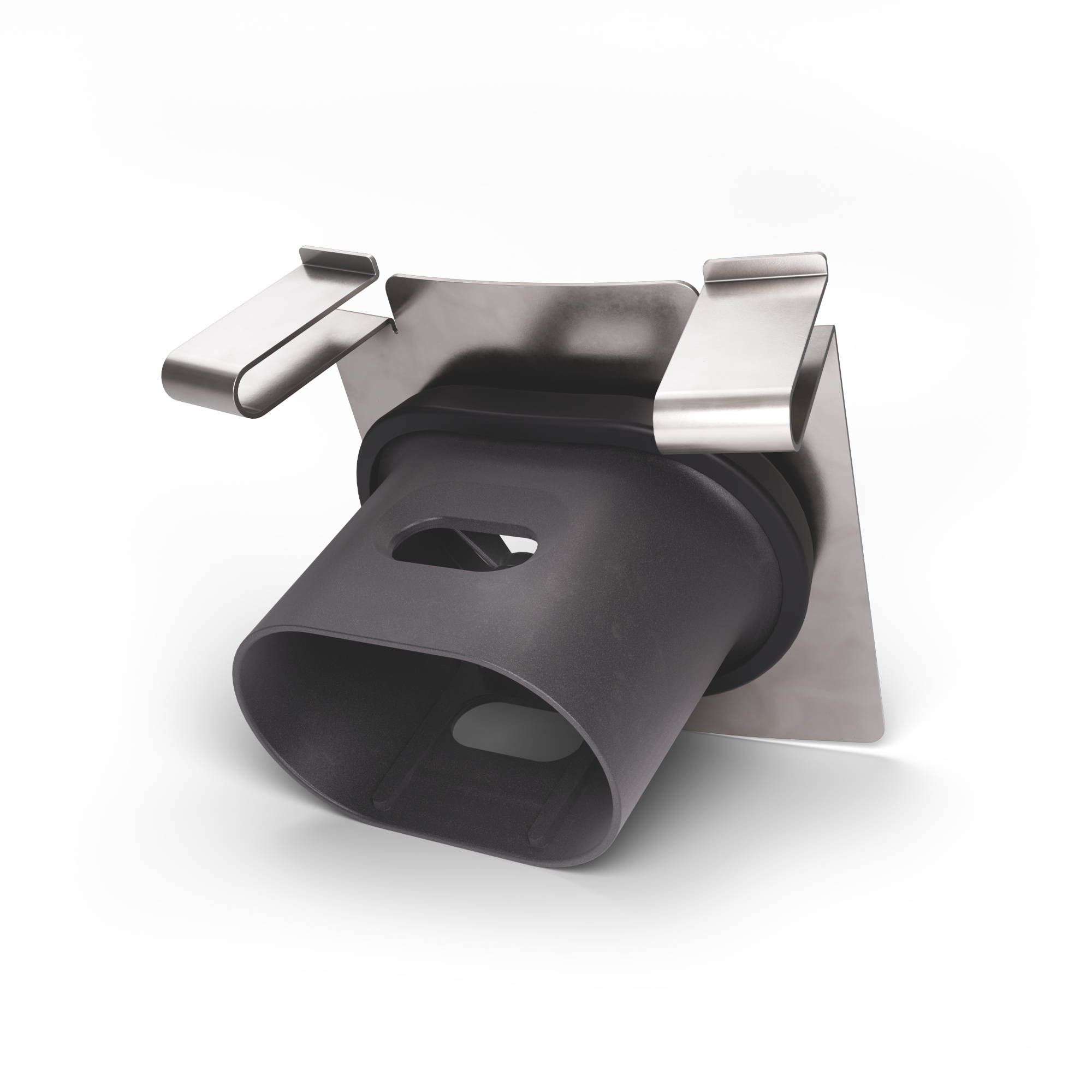
Attach the mount to the grill:
- Slide the grill's vent screen open for the best airflow.
- Orient the spring tabs facing up (we recommend this for this step), then insert the lower edge of the mount into the lower rail of the bracket on the grill.
- Compress the spring tab arms with your fingers and push them toward the grill. The tabs should fit under the upper rail when you release them.
- Check that the mount spans the full height of the bracket. If the spring tabs do not reach the top rail, you may have the wrong bracket size.
- You are now ready to attach the Engine to the mount.
- Once the Engine is attached, if there are visible air gaps between the mount plate and the adapter, tighten the nut as needed.
If you are using the Standard Mount (non-kamado grills)
Tighten it only finger-tight, with a slight additional turn. Overtightening can deform the bracket and reduce airflow.
Using the dial
The dial is your main control during a cook, and you turn it to Off when you're done. There are three ways to run the Engine:
- Manual fan mode: you set the fan speed by hand. Great for getting the fire going before you switch to a temperature. This mode runs from the dial on its own.
- Temperature presets: pick a numbered target on the dial and the Engine holds it (with a Giant Grill Gauge or Predictive Thermometer connected).
- App mode: set a precise target and monitor from your phone.
The temperature-holding modes rely on your Giant Grill Gauge or Predictive Thermometer, coordinated through the Combustion app.
Controlling the Engine from the app
Once the Engine is set up, it appears inside the card for the tool it is attached to, your Giant Grill Gauge or Predictive Thermometer, because the Engine and the tool it reads from work as one system. You can also open the Engine as its own device: tap the Engine icon on that card, or find it in the device browser at the bottom of the screen and swipe between your devices.
The Engine's row tells you three things at a glance:
- Whether the fan is running. It reads Fan on or Fan off.
- The target temperature, and what set it. Next to Target you will see either App or Dial. That word tells you what is in charge right now.
- How hard the fan is working, shown as a percentage.
Setting a target from the app
Tap the three dots next to Target. A keypad opens. Type the temperature you want, use the °F/°C key to switch units if you need to, then tap Update Target.
If the app will not let you change the target
Look at the word next to Target. If it says Dial, the Engine is following the physical dial, and the target cannot be changed from your phone. This is the dial doing its job rather than a fault or a connection problem.
Watching the fan and the grill together
Open the Giant Grill Gauge or thermometer that the Engine is attached to, and you get both halves of the story on one graph: your grill temperature against the left axis, and the Engine's fan output as a percentage against the right.
That combination is the quickest way to see whether the Engine is coasting or working hard. A fan sitting at 100 percent while the temperature stays flat usually means air is leaking in elsewhere, or the fire needs more fuel.
How the Engine holds your temperature
In automatic mode, the Engine reads your grill temperature from your Giant Grill Gauge (recommended) or Predictive Thermometer and pulses air into the fire to match your target. It learns your grill by running short test cycles: it blows a bit of air, measures how your grill's temperature responds, then fine-tunes its air pulses to hold your target. So control tightens as the cook goes on, and you don't have to tell it what kind of grill you have.
One thing worth knowing: the Engine adds air to raise the temperature, but it can't actively cool your grill down. If you overshoot your target, it eases off the air and lets the fire settle rather than forcing the temperature down. Setting your top vent correctly helps it hold a tight temperature.
Turning the Engine off
Turn the dial to Off. The fan stops, and an internal door closes to limit air draw through the unit. As it powers down, the light turns white and fades out. (If the Engine is shutting off because the battery ran out, the light fades red instead.) A repeating blink (white every 5 seconds) means the Engine is still on, not powering down.
For every light pattern, see Combustion Engine: Light (LED) Behavior.
When you're done cooking, you can remove the blower from the mount for charging and storage.
Cooking at high heat (protect your adapter)
The Engine can be set up to 575°F, but for high-temperature cooks it's important to keep the mount away from direct contact with the coals. The adapter is made from high-temperature plastic that begins to soften around 450°F and can melt if a hot coal lands on it.
- At 500°F and above, keep the mount or bracket 3 to 4 inches away from the hot coals. On a Weber Kettle, place the coals on the opposite side of the grill from the mount.
- Do not attach the Engine while adding lit coals. A falling coal can melt the adapter almost instantly. Install the mount first, then add the coals.
If the adapter becomes scorched, it's usually only cosmetic and won't affect the Engine itself. However, if the adapter melts significantly, it will need to be replaced, so a little care during setup goes a long way.
Cleaning, storage & travel
- Cleaning: The Engine is weather-resistant, with built-in drain holes, but it is not fully waterproof. Wipe it clean with a damp cloth or a sponge and a little dish soap. Do not hose it down or submerge it in water.
- Storage: After each cook, remove the blower unit from the mount and recharge it so it's ready for your next use.
- Travel: Before packing the Engine, place a piece of tape over the control dial to prevent it from turning on accidentally. The battery has passed UN38.3 transportation testing, so it is safe to bring on commercial flights.
If the Engine can't reach your target temperature
- Check that every other vent is sealed. If air is leaking in elsewhere, the Engine can't control the fire.
- Make sure your top vent is open a little but not wide open.
- Add charcoal if your fire is dying. A fading fire is the most common reason the Engine can't reach a higher target.
FAQ
Can I use the Engine without the app?
You'll need the Combustion app for the initial setup and to choose which device controls the Engine. After that, you can use the dial's manual fan mode without the app. However, automatic temperature control, monitoring, and remote access require the app because it coordinates communication between the Engine and your Giant Grill Gauge or Predictive Thermometer.
Does the Engine send my grill temperature to the app?
Yes. When paired with a Giant Grill Gauge or Predictive Thermometer, the Engine works with the Combustion app to display both your grill temperature and food temperature in one place, making it easy to monitor your cook.
Do I need a separate thermometer to use the Engine?
Not if you're using manual mode. In manual mode, the Engine functions as a variable-speed fan that you control with the dial. For automatic temperature control, however, you'll need either a Giant Grill Gauge or a Predictive Thermometer so the Engine has a grill temperature to regulate. The Giant Grill Gauge is the recommended option because it provides the most accurate measurement of your grill's internal temperature.
What happens if the Engine loses its connection during a cook?
If the connection is lost, place the Engine and its paired Giant Grill Gauge or Predictive Thermometer next to each other for about 30 seconds, then power the Engine off and back on. This will usually re-establish the connection. We're aware that occasional signal drops can happen in some setups, and we're continuing to improve connection reliability through firmware updates.
Still stuck?
If your Engine will not hold a temperature, will not connect, or is behaving in a way this guide does not cover, email [email protected] and include:
- Which grill or smoker you have, and which mount or adapter you are using
- Whether you are controlling it with a Giant Grill Gauge or a Predictive Thermometer
- Where the dial is set, and what the Combustion app is showing
- The firmware version on your Engine
- A photo of the Engine mounted on your grill, with the vents visible if you can
The Engine is our newest product, and that level of detail genuinely helps. It also tells us quickly whether something is a setup issue we can solve in one reply or something we need to feed back to engineering.
[Related keywords: combustion engine, engine, blower, fan, draft control, temperature controller, getting started, setup, set up, how to use, first cook, whats in the box, install, mount it, install on grill, dial, knob, control dial, manual mode, manual fan, fan speed, temperature preset, app mode, target temp, set temperature, automatic control, how does it work, learns my grill, wont reach temp, cant reach target, overshoot, too hot, close the vents, top vent, bottom vent, ash drawer, light the coals, charcoal, turn it off, wont turn off, dial off, charging, charge time, usb-c, cleaning, storage, travel, flying, airplane, high heat, 575, melted adapter, scorched, adapter melted, lost connection, disconnects, wont connect, reconnect, giant grill gauge, ggg, predictive thermometer, do i need a thermometer, do i need the app]